
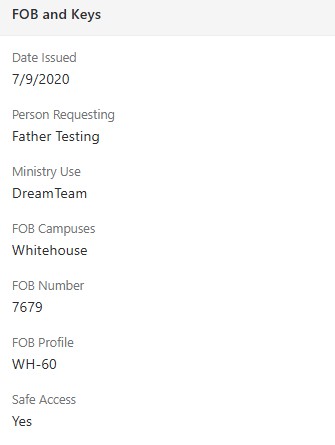
Did you know that you can view a Dream Team member’s fob information? Go to their Rock profile and click on additional information. Scroll down on the left hand side to FOB and Keys.
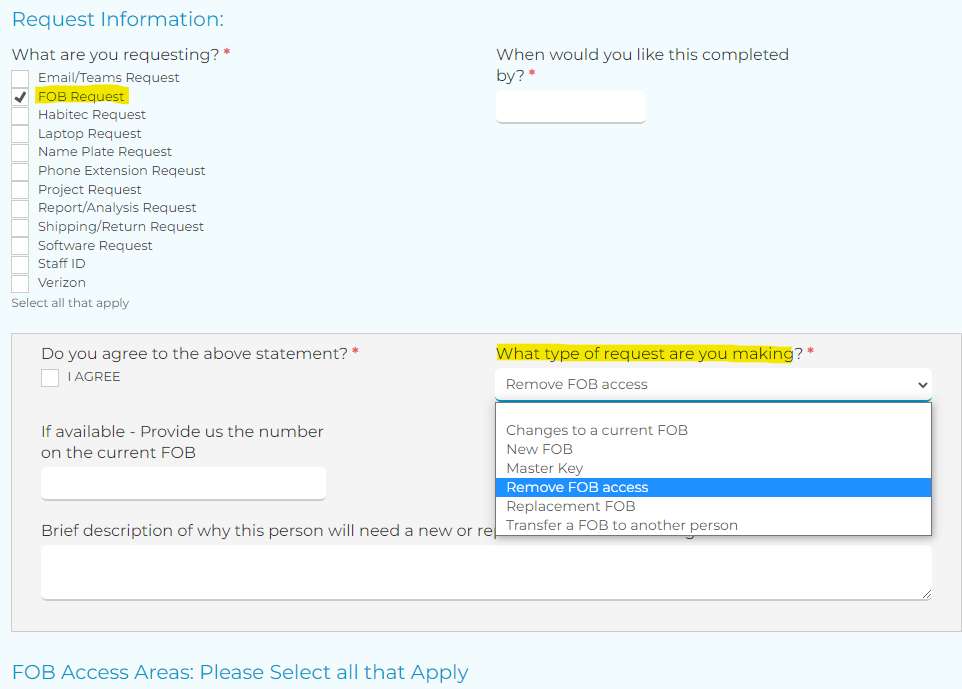
Also, if you need a fob, a fob change for someone, to transfer a fob or remove access, you can do that by filling out a Ministry Services Request Form on CreekHelp.
NOTE: If you are requesting access to Kids, Students, or Safes it is your responsibility to be sure they have a current passed background check.
If you have a Dream Team member that no longer needs a fob, please fill out the CreekHelp form and return the fob to Central Support. If you cannot retrieve the fob it is still important to fill out the CreekHelp form.
- Why?
- Those with a FOB could cause a security risk if someone else gets the FOB or they have access to an area and we are unaware.
- FOBs can be reused.